Designing governed workspaces with visible access, provenance, and sync state
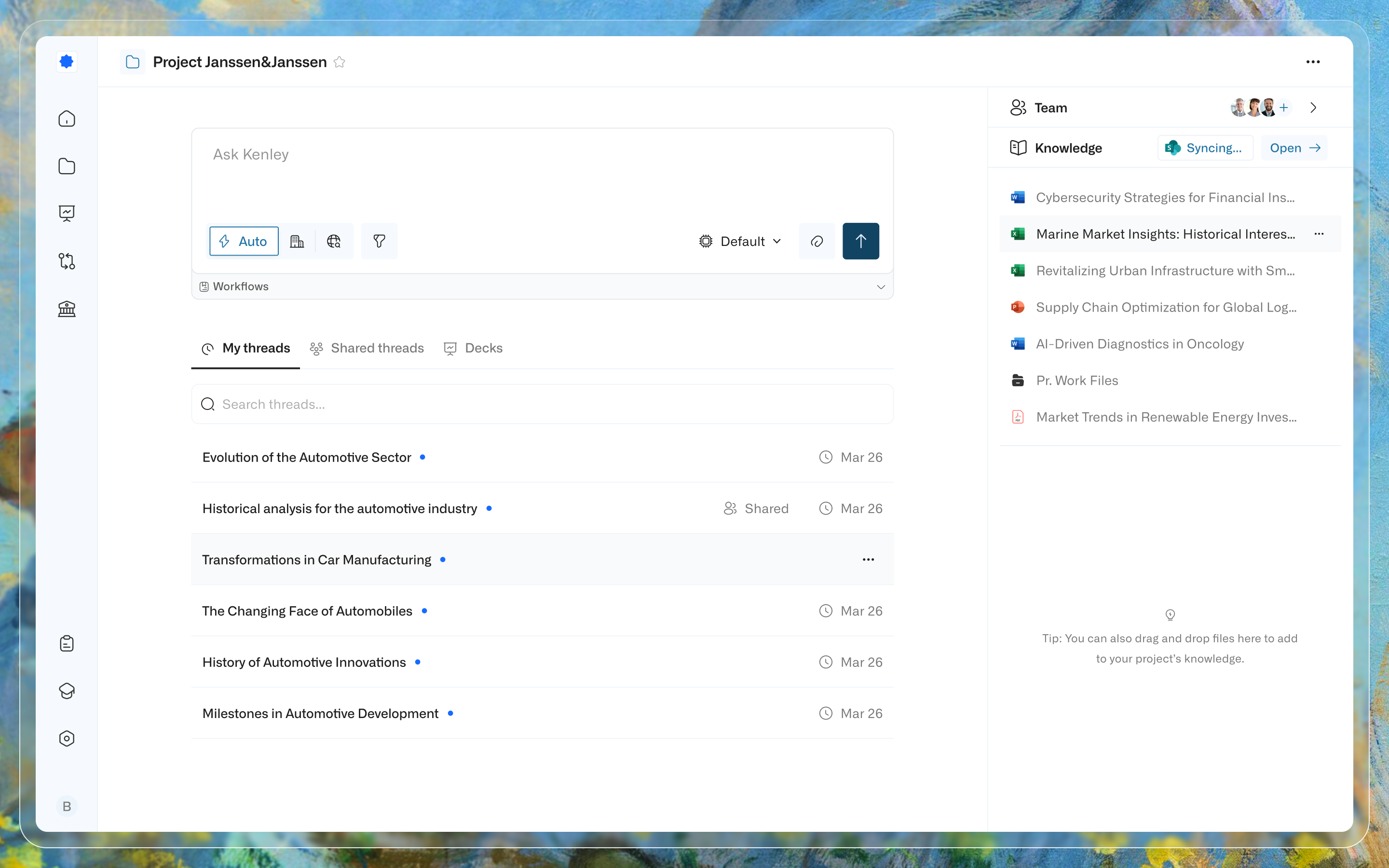
At Kenley, I led the design of Workspaces: the shared project layer beneath Chat and Workflows. Chat is where users search project knowledge, asked questions, and perform actions against it. Workflows turns a team’s way of working into a reusable sequence.
This epic brought both together with workspace creation, access scope, external knowledge, and sync recovery so teams could understand what information Kenley was using (and whether it was current).
My role
- Defined the Workspace product strategy through ongoing research with enterprise consulting customers.
- Designed the end-to-end experience across workspace creation, source connection, knowledge management, sharing, and sync recovery.
- Translated source-system, access, compliance, and data-currency constraints into product behavior that teams could understand.
Product impact
- Alongside Workflows, Workspaces contributed to onboarding three enterprise customers and a seven-figure increase in annual recurring revenue.
- Across one enterprise deployment, users ingested more than 100k files across 5000+ folders from connected SharePoint and Google Drive sources. These figures exclude files added through manual uploads.
- Existing customers created/joined a median of 15 collaborative workspaces per user within three months of launch, with a peak of 50+.
- The experience established role-based access, GDPR, and accessibility as baseline product constraints rather than administrative afterthoughts.
At a glance
Kenley helps consulting teams work with large bodies of source material through Chat and Workflows. In Chat, users search prior work, ask questions, and perform actions; Workflows turns repeatable tasks into runnable processes. Both depend on the quality of the knowledge beneath them.
Historical material could already be ingested and queried through Chat. Live project work was harder: it remained distributed across SharePoint and other sources, changed throughout an engagement, and was shared with different groups of people.
The design challenge was therefore not simply to create another place to store files. It was to give teams a shared project space whose contents, access boundaries, and current state they could understand.
[SharePoint]   [Google Drive]   [Manual uploads]
      \              |               /
       +-------------+--------------+
                     |
                     v
         +-------------------------+
         |       WORKSPACE         |
         |-------------------------|
         | Audience and access     |
         | Connected knowledge     |
         | Sync and failure state  |
         +------------+------------+
                      |
          +-----------+-----------+
          |                       |
          v                       v
        [Chat]                [Workflows]
          \                       /
           +----------+----------+
                      |
                      v
[Generated artifacts (e.g PowerPoint, Word, Excel)]
Static imports hid stale knowledge
Consulting teams rarely begin with a blank workspace. They inherit client folders, internal precedents, uploaded files, and material that continues to change as the work progresses.
A one-time import creates a hidden failure mode. Documents can be edited, moved, or removed while the copied version inside the product quietly becomes stale. When an AI system reasons over that incomplete snapshot, the resulting answer can sound confident while relying on the wrong source material.
Research with enterprise customers surfaced three connected needs:
- Connection: Bring external knowledge into Kenley without repeatedly uploading it.
- Currency: Make sync success, failure, and recovery visible.
- Scope: Make it clear who a workspace is for and what knowledge it contains.
BEFORE: UPLOADED KNOWLEDGE & INGESTED MEMORY

[Institutional Memory] -> [Manual uploads] -> [**Static** snapshot]
      |
[Source changes]
      |
      x  <- connection lost
      |
      v
[Chat / AI output]
      |
[Source currency unknown]
      |
      v
~[Suitable for institutional memory but unreliable for live project work]

-----------------------------------------------------------------------------

AFTER: CONNECTED KNOWLEDGE

[Living source] <==== auto-sync ====> [Workspace]
                                           |
                                [Scope + sync status]
                                           |
                                           v
	                               [Chat / Workflows]
Treating the workspace as a governed boundary
We treated a workspace as more than a folder. It became the product boundary where a team decides who the space is for, which sources it can use, and whether those sources are current.
That strategy led to three major design decisions.
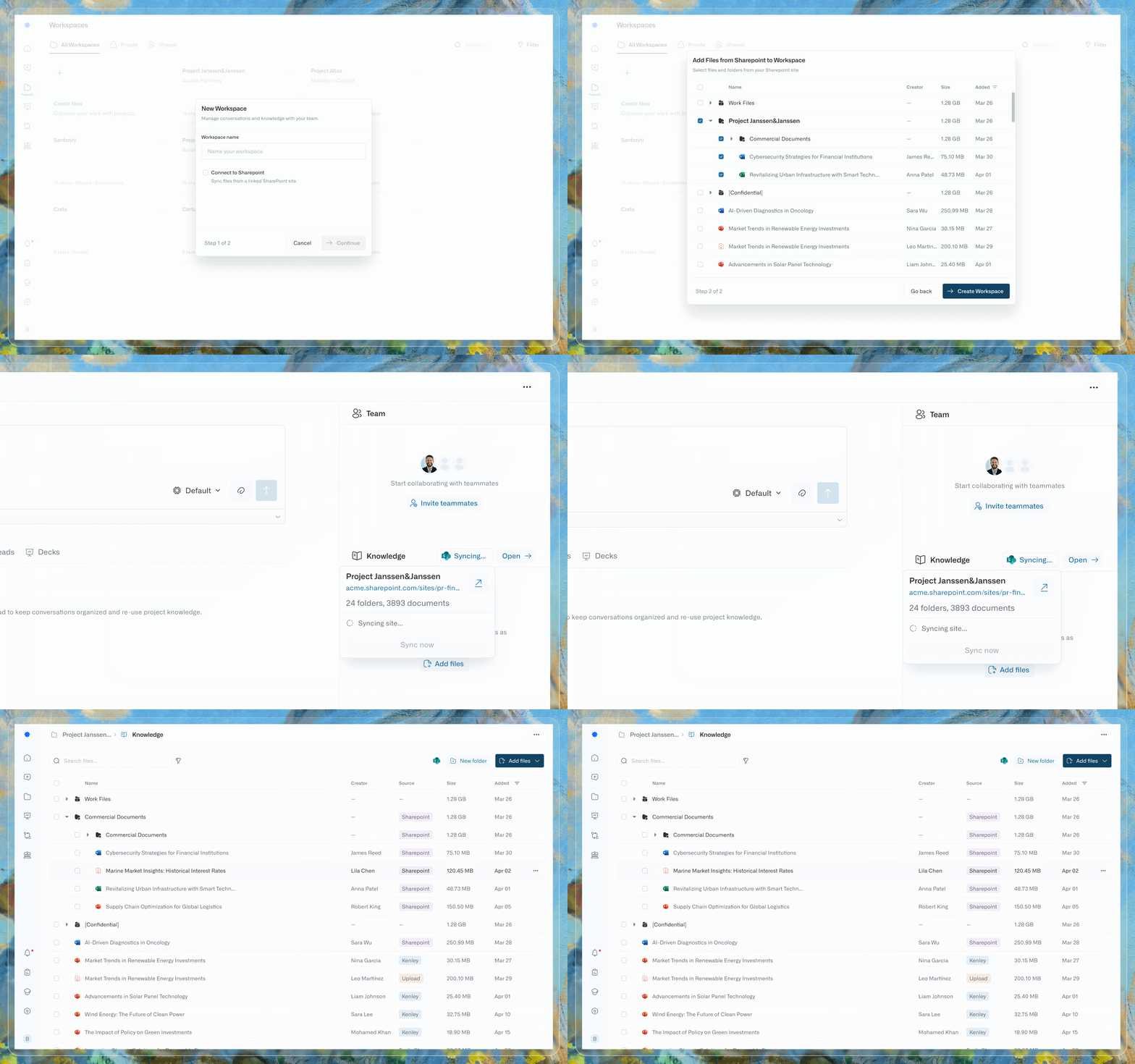
1.Connect live sources, not copies
Manual upload was useful for one-off conversations, but it did not reflect how consulting teams maintained a working corpus. Their material already lived in SharePoint and continued changing there.
I designed the external-source connection so knowledge could remain linked to its origin, while still supporting direct uploads when that was the right path. Workspace Knowledge brought those sources into one surface, and an upload control let people decide when new files should become part of the shared corpus.
Connecting the source introduced a dependency on its permissions, availability, and structure. In exchange, the workspace could represent the team’s working knowledge rather than an increasingly stale snapshot.
2.Keep creation fast, then define access
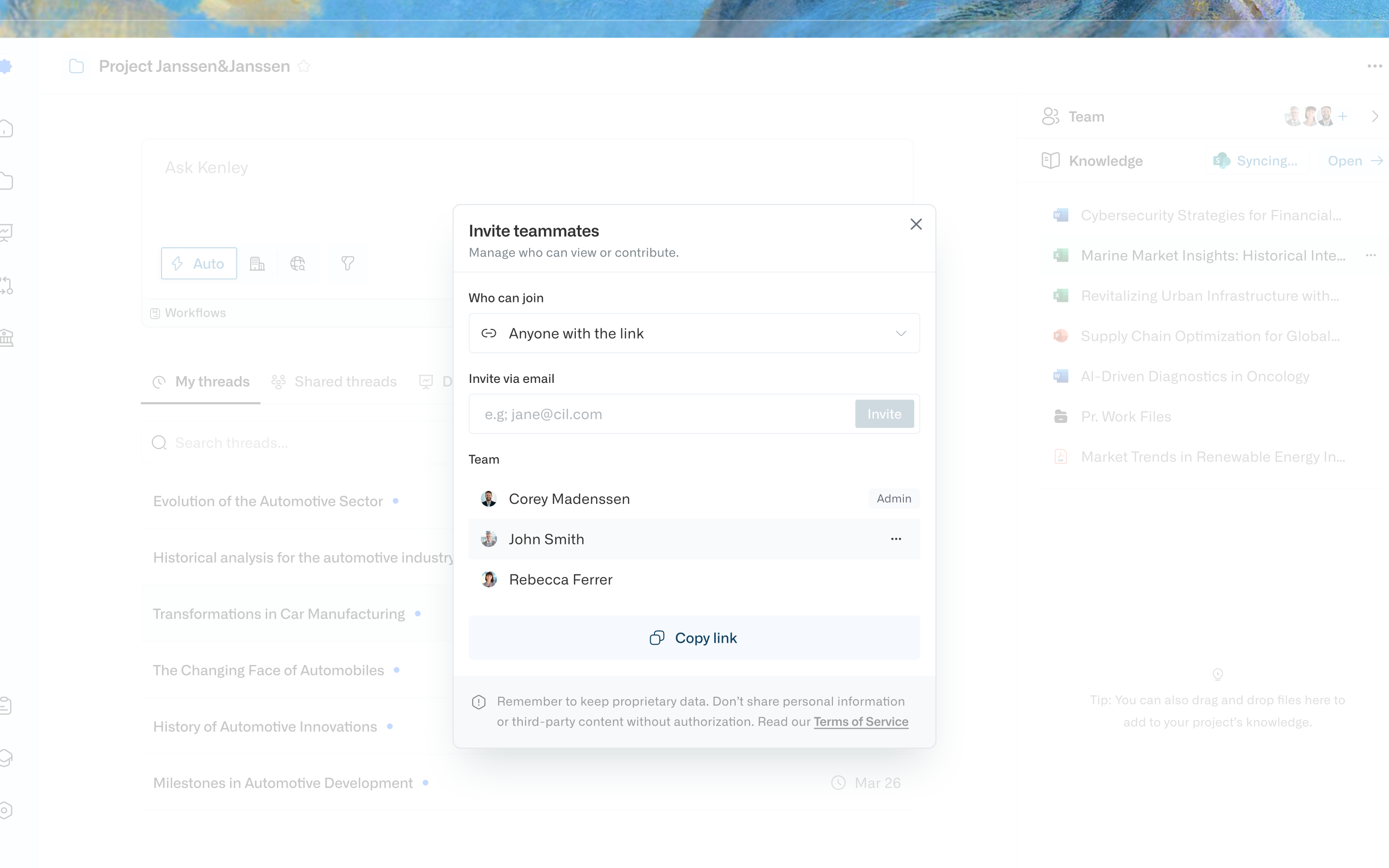
Private, shared, and firm-wide workspaces carried different expectations about membership and source access. Requiring those decisions upfront would have added friction before users had begun assembling the workspace.
I separated workspace creation from access configuration. Users could create a space first, then configure its audience as collaboration began. Individuals could keep project spaces narrow, while administrators could establish firm-wide workspaces for shared knowledge.
This kept initial setup lightweight while making scope explicit when it became relevant to collaboration and access.
3.Make failure a first-class product state
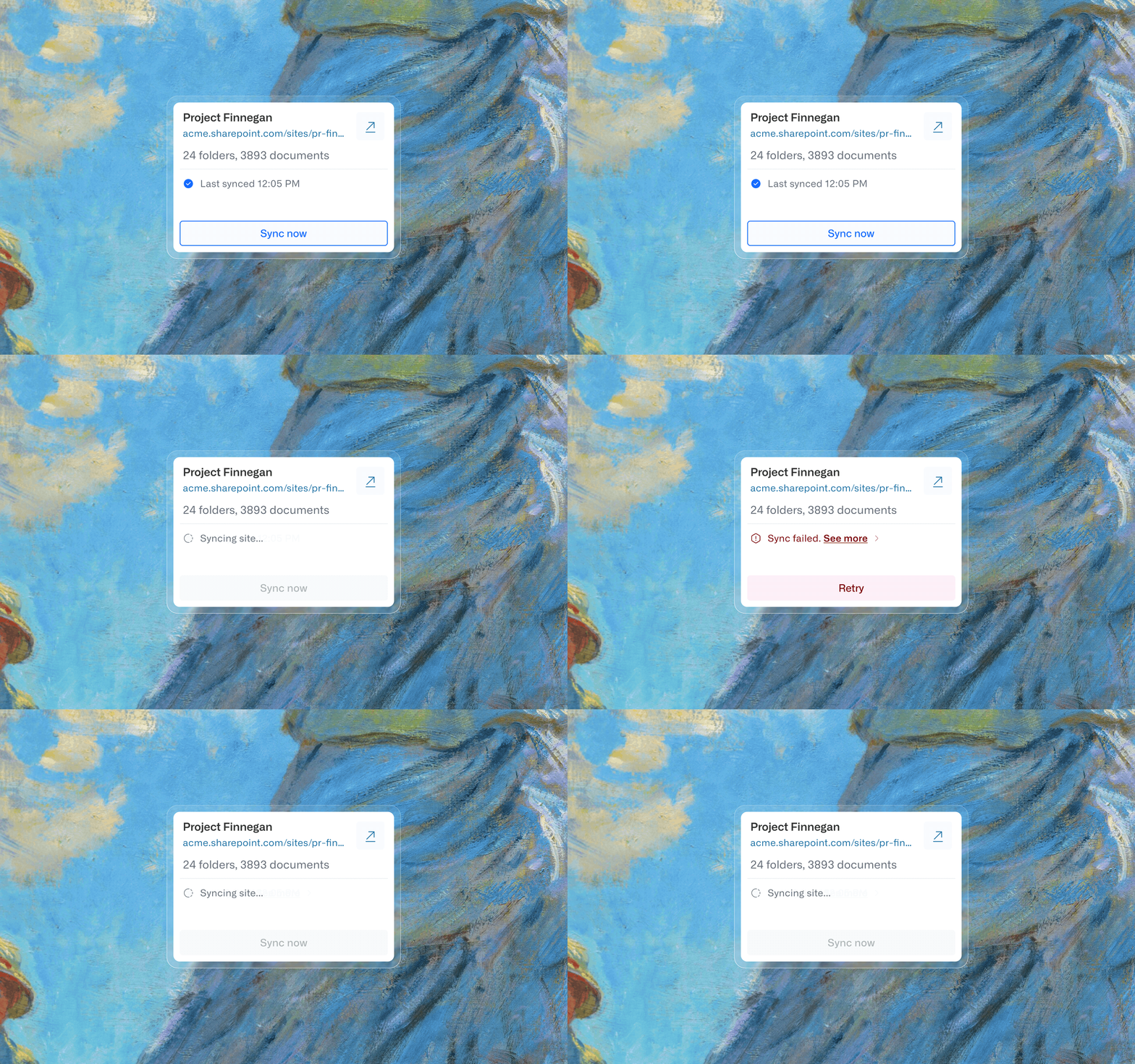
Connected sources synchronized automatically, typically every 10 minutes, and failed connections were retried on the same cadence. I designed the remaining failure states to be explicit: when automatic recovery did not succeed, the workspace identified the affected source and provided a manual retry path.
This was the most important trust decision in the experience: a workspace could only credibly say its knowledge was current if it was equally clear when it was not.
[Source connected]
        |
        v
   [Sync starts]
      /       \
     |         |
     v         v
[Current]   [Sync failed]
                |
                v
      [Affected source shown]
                |
                v
             **[Retry]**
            /       \
           |         |
           v         v
    [Recovered]  [Still failing]
                       |
                       v
                [Manual trigger]
From connected knowledge to useful work
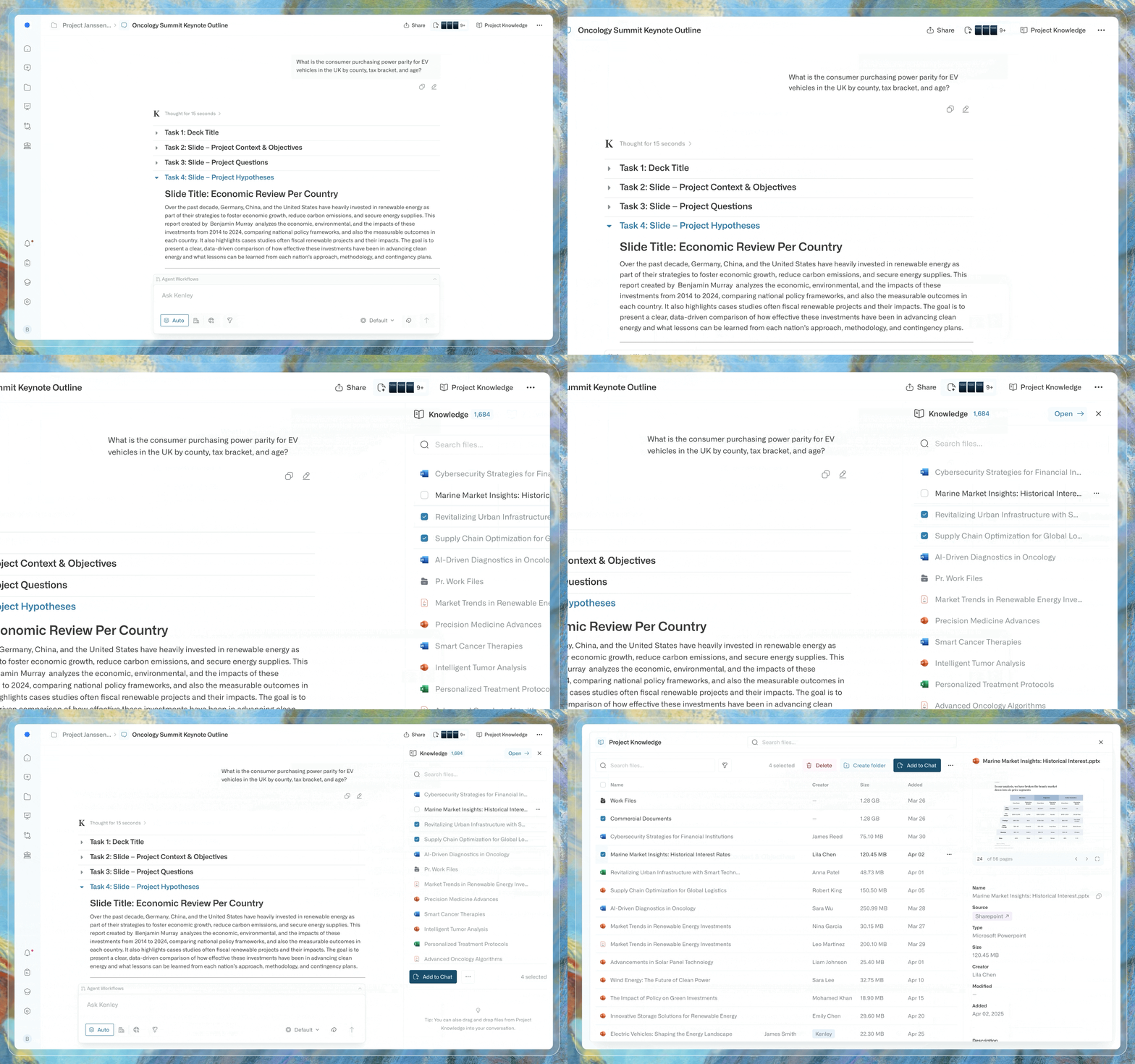
A workspace became valuable when its knowledge could be used in the rest of Kenley. Teams could draw on workspace material in Chat and Workflows, while the surrounding Workspace experience made the provenance and scope of that material legible.
This connected the infrastructure decision to the everyday product experience: every answer, workflow run, or generated artifact inherited the quality of the sources beneath it.
Enablement
Workspaces and Workflows helped Kenley onboard three new enterprise customers and contributed to a seven-figure increase in annual recurring revenue. Across one enterprise deployment, users ingested more than 100k files across 5000+ folders from connected SharePoint and Google Drive sources, excluding manual uploads. Within existing customers, users created/joined a median of 15 collaborative workspaces each during the first three months after launch, with the most active user creating/joining 50+ workspaces.
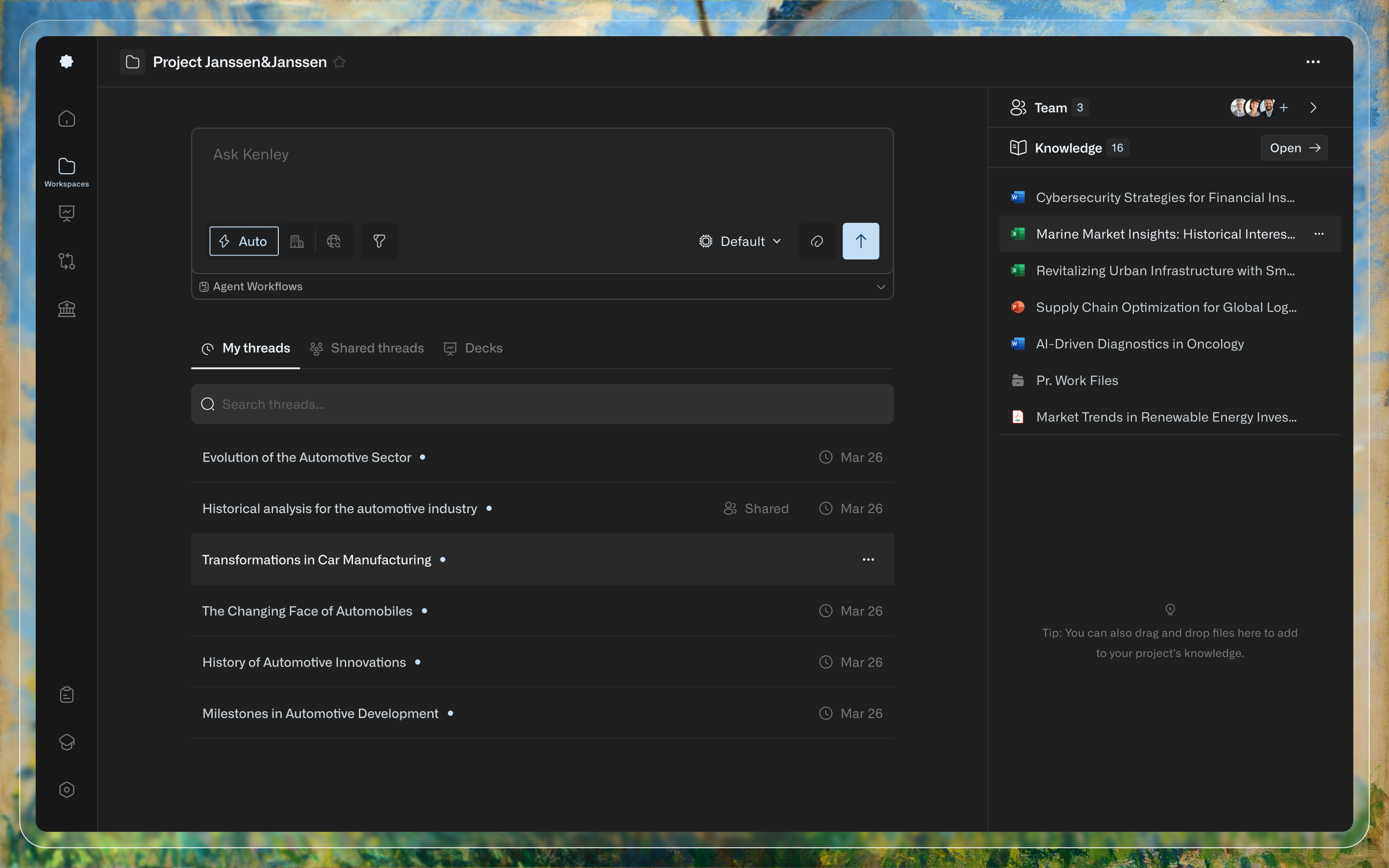
More importantly for the product, Workspaces gave source governance a visible home. Access, connected knowledge, and sync state became part of the working experience rather than invisible infrastructure users were expected to trust.
Reflection
The most useful lesson was that trust in an AI product is often decided around the model rather than inside it. A strong answer is still unreliable when its underlying knowledge is stale, incomplete, or available to the wrong audience.
Designing Workspaces meant making those surrounding conditions visible and actionable. By treating scope, source connection, and failure recovery as product decisions, we created a more credible foundation for everything Kenley generated above it.
Customer Perspective
For another perspective on Kenley’s use in consulting practice, watch ClearView Healthcare Partners share their experience.